I have been using me.com for a while now, and am relatively happy with it. The automatic sync of the data between my work laptop and my iPhone is absolutely priceless. Now I’ve upgraded to the family account to share the (for my needs) ample 40 GB with two friends. Turns out, the other two accounts can only get 5 GB of storage. Ouch. That sort of sucks. Right now, 10 GB cannot be used at all, cause they are reserved for two more people. Why am I then paying for the extra storage anyhow?
Author: root42
VLC 1.1.0: Broken deinterlace on OS X
Well, I was wondering why some DVDs looked jaggy on OS X when watched with VLC 1.1.0. It seems deinterlacing on VLC for OS X is currently broken. The bug is fixed now, but we probably have to wait some more time for a 1.1.1 release.
New Book: Modeling and Tools for Network Simulation
There is a new book out, for which I contributed part of a chapter: Modeling and Tools for Network Simulation. The book is meant to be a textbook for everyone who needs to simulate computer networks. From the physical layer to the application layer, some best practices are described. Contrary to Amazon and Springer’s webpages, the book has more than 256 pages. It’s got more than 500 pages, so it is rather comprehensive.
Shortcuts on OS X
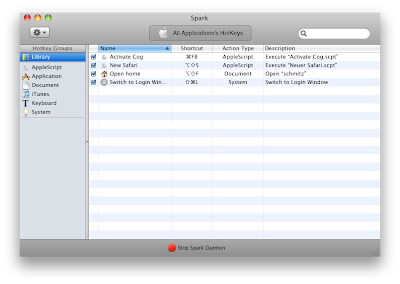
I use Spark for defining global shortcuts to tools, applications etc. One of the best things is shortcutting to the login window. This way you can quickly lock your screen, which is not bindable by default in OS X. Also useful: shortcuts to AppleScript, e.g. for opening a new Safari window. This is what Spark looks like, when you edit the shortcuts:

Yellow pages when printing with Debian?
We had the problem of yellow tinted printouts on our Debian Testing machines. With my OS X machine, I did not have this problem, although both system use CUPS 1.4.3 for printing. It seems that Ghostscript was the culprit. The pstopdf filter to be exact. This bug report in the Debian bug tracker describes the exact same problem. The idea is to comment out the “-dUseCIEColor” option. I am not sure in how far this will also change the colour reproduction, but since our systems are not colour calibrated anyhow, I think this will not matter.
Cococa Emacs
I just found out that there is a new website with Cocoa based Emacs builds. Now I can switch from the out-of-date MacPorts version to the Emacs 23.2 of Emacs for Mac OS X.
Update: This is really nice, now also the GUD debugger frontend works nicely. Check it out:

Typo3: Filelinks are not actually links
Whoever named the Typo3 filelinks, should be fired. Out of a cannon. Into the sun. This is because the filelink, does not actually link to a file, but it copies it to some folder (upload/media by default). Why this is so, is beyond my understanding. When you add a simple link in the RTE, and link to a file, you get the expected result: You get an <a> tag linking to the corresponding file in the fileadmin/ folder of Typo3. But when using the filelink, the file will be copied to the upload/media/ directory.
I have tried to use the DAM extension (digital asset management), but that is such a convoluted, under-documented beast, that I got rid of it very quickly. Now I still do not have a solution, but I welcome every hint on how to solve this.
Mobile Multi Display has hit the AppStore
One of the projects I have been working on at the lab has made it to the iPhone AppStore. It’s the Mobile Multi Display, and you can find more information about it on its website: http://www.graphics.rwth-aachen.de/software/mmd/.
Mounting the iDisk in Linux
Ok, so the Apple iDisk of me.com fame seemingly cannot be used from within Dolphin, the KDE file manager. Either something in Dolphin or me.com is rotten. However, I solved the problem by installing wdfs, the FUSE based webdav mounter. Using wdfs and rsync on the command line is much easier anyway…
Switching flyspell dictionaries on the fly
Since I am using Emacs for most of my text processing, and it comes with the nice Flyspell mode, and I do write English and German the most, I found this nice snippet from the Emacs wiki:
(defun fd-switch-dictionary()
    (interactive)
    (let* ((dic ispell-current-dictionary)
    (change (if (string= dic "deutsch8") "english" "deutsch8")))
      (ispell-change-dictionary change)
      (message "Dictionary switched from %s to %s" dic change)
      ))

(global-set-key (kbd "<f8>")   'fd-switch-dictionary)
On OS X, I recommend to use emacs-app or emacs-app-devel from MacPorts. For flyspell to work correctly, also make sure to install aspell and e.g. aspell-dict-de. Otherwise the above function will complain, most probably.