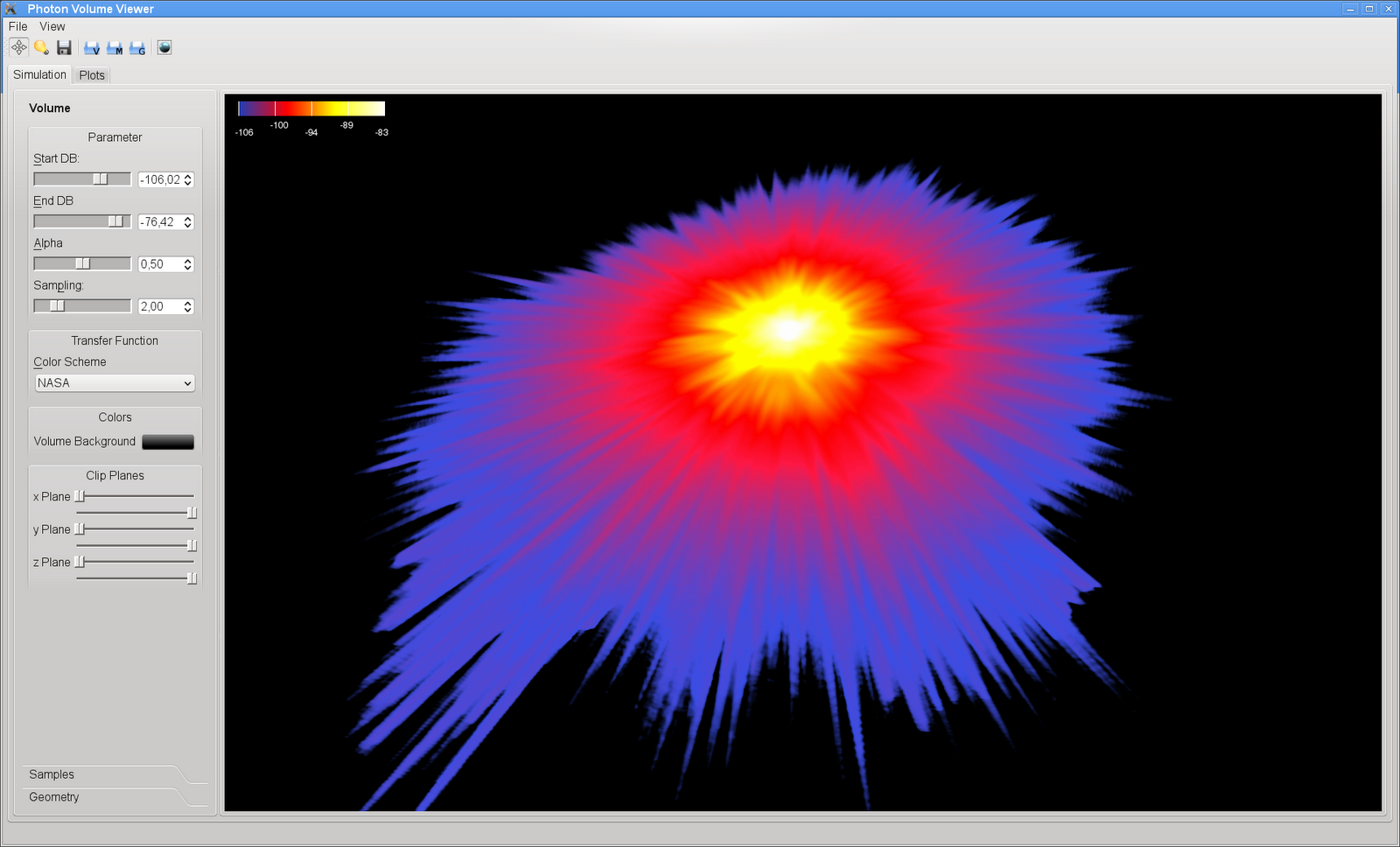
I have written a neat little Spherical Harmonics explorer. Right now, the projection function has some weird bug still, but the basis functions, and arbitrary combinations of them can be viewed nicely. The tool is written in Python, using PyQt4 and PyOpenGL. Python is excellent for prototyping such a tool. It might not be as fast as C++, but the rendering speed using PyOpenGL is more than enough and very smooth. I might put the small 3D viewer widget online later, because it might be useful for many people. Here’s some eyecandy:
Author: root42
Selecting between overloaded signals in PyQt
The signal mechanism in Qt allows for overloading. E.g. the QSpinBox comes with two signals called valueChanged(int) and valueChanged(QString). However, since Python is dynamically typed, such overloading gives rise to problems. Here is how you can select which signal you want to connect to your slot:
from PyQt4 import QtCore, QtGui, uic
class MyMainWindow(QtGui.QMainWindow):
def __init__(self):
QtGui.QMainWindow.__init__(self)
self.ui = uic.loadUi("MyMainWindow.ui", self)
# Slot connections
self.ui.spinBox.valueChanged.connect(self.spinBoxChanged)
self.ui.spinBox.setValue(4)
@QtCore.pyqtSlot(int)
def spinBoxChanged(self, i):
# do something...
pass
Notice the (int) in the decorator of the slot. This has to match the signature of the signal. I haven’t dug into more complex signals, passing around arbitrary objects, but I think that is not a problem: Qt datatypes have a Python wrapper, and functions in Python cannot be overloaded anyway, so there won’t be clashes with pure Python signals and slots.
Redefining quit-char in Emacs 23
The quit command C-g is pretty much standard in Emacs. It runs the interactive function keyboard-quit and also serves as the default quit-char. It aborts basically every running function, also it allows you to cancel operations in the minibuffer. The Emacs documentation describes current-input-mode, set-input-mode and set-quit-char for getting and setting the quit-char value. Also, global-set-key allows you to rebind keyboard-quit to another character. However, this does not work very well. The quit-char is not settable for non-tty Emacs versions, e.g. on OS X using Cocoa Emacs you get this:
So, basically nothing changes. On a tty it looks more promising:
After rebinding the keyboard quit as well, using (global-set-key (kbd “C-q”) ‘keyboard-quit), not much happens either. It seems the minibuffer assumes C-g to be the choice of the day. Running find-file with C-x C-f or interactively via M-x find-file, and then hitting C-q does nothing except printing “Quit”. Hitting C-g however quits the minibuffer. This seems to be documented in Bug #1218 of Emacs.
gitx with push / pull support
I love gitx, the git GUI for OS X. However, it used to have no push / pull support. Which is pretty important for git. But git and github are beautiful pieces of software. So there is another fork on github, containing push / pull support and more. This little context menu made me happy:
Backup of running VirtualBox machines
If you are using VirtualBox for running servers, you might have stumbled across the question: How do I backup a running virtual machine? The problem is, that the machine state, consisting of the hardware state and especially the virtual harddisk, might change during the backup. This means that you will most probably end up with an inconsistent machine state, from which you might not be able to recover, after restoring the machine from your backup.
So I thought up a little script that creates a static machine state that can be backed up, while the vbox continues to run on a current, changing machine state.
Requirements: two states named current and previous (you have to add them manually first), where “current” is the current vbox snapshot, which the machine is running on. The script will move the current state to the name “previous”, and delete the old “previous” state. It will then take a new “current” snapshot.
The previous snapshot (.vmdk and .sav) together with the main .vmdk or .vdi can then be used for backup purposes.
So it’s a good idea to run this script before your daily backup run. The snapshots take only some seconds. Deleting the old snapshot might take a bit longer, because the deleted machine state is committed back to the main machine state.
Note that your backup software will fail to backup the current snapshot correctly. However, since vbox generates random IDs for the states, it is not easy to exclude the file from the backup set. So just ignore error messages from your backup software concerning that particular state file. This way you will have a machine state that lags only some minutes compared to your backup system.
#!/bin/bash
VBOXMANAGE="/usr/bin/VBoxManage -q"
if [ $# != 1 ]
then
echo "Usage: $0 VBoxName"
exit
fi
echo "Renaming old snapshot..."
$VBOXMANAGE snapshot "$1" edit previous --name deleteme
echo "Renaming current snapshot..."
$VBOXMANAGE snapshot "$1" edit current --name previous
echo "Taking new snapshot..."
$VBOXMANAGE snapshot "$1" take current
echo "Deleting old snapshot..."
$VBOXMANAGE snapshot "$1" delete deleteme
Evoke 2010 wrapup
On Friday and Saturday I went to the Evoke 2010 in Cologne together with 0xtob. Exactly 25 hours before the 4k Intro compo deadline we started coding… Well, I haven’t coded an intro ever before, 0xtob has some more experience. Plus the two other, very brilliant entries in the competition had much more time to prepare. But nevertheless we managed to submit an entry for Linux, which took about 3.2KiB.
0xtob even managed to code a minimalistic sound engine in less than an hour, so that we had at least some noise playing in the background. The whole intro is just one scene without any fading in or out so far. It’s basically a raytraced implicit, morphing function (interpolating between two animated implicit functions). So we actually do not render any explicit geometry. The raytracer is written in GLSL, and the textures are a port of Ken Perlin’s original improved Perlin noise to GLSL, which I somehow managed to do. The intro runs on both Linux and OS X, but on OS X it is currently about 7KiB, so not quite 4k. A Windows port will follow at some time, I guess. We are planning to clean up and beautify the intro somewhat and put it on pouet in the coming weeks.
All in all it was a lot of fun, and we got a lot of help: jix borrowed us his MBP running Linux, because the orga did not want to accept OS X as the host OS, and 0xtob’s Quadro NVS was not up to the task rendering the whole thing in 720p. 🙂 Some unknown guy borrowed us the MDP to DVI adapter. Robert helped to crunch the binary to minimal size, and also made the shader more colourful than ever. Roman gave helpful hints and was another pair of eyes watching over the code.
MobileMe bugs: Image upload with Linux based browsers impossible
Well, the MobileMe gallery upload seems to only like Mac browsers. I have only my SuSE box here, so I tried to upload using Chrom 5.0 and Firefox 3.5. No luck. Both browsers throw errors. Just like this:
So far, I cannot find any documentation on this behaviour. I would have assumed that either FFox or Chrome would work. MobileMe on OS X says it supports FFox and Safari. But since Safari is not available on Linux, I thought I might try FFox and Chrome. Now waiting for a MobileMe chat support guy. I doubt they are educated enough to actually help me…
Update: The chat guy was friendly, and had one hint: update to FFox 3.6. I was still on 3.5. And sure enough: now the upload works. Only one file at a time, though. But I found out even more on my own. It seems all the images are accessible from your iDisk as well. They are stored in Web/Sites/_gallery/id. Where id is the number of your gallery. However, you cannot just upload pictures there. Every image needs to be put in a separate directory. Every directory must then have the following files:
exif.json
large.jpg
medium.jpg
square.jpg
web.jpg
large.jpg: 2048×1536 (original resolution? at least for iPhone 3GS)
medium.jpg: 427×320 (approx. iPhone screen resolution)
square.jpg: 160×160 (thumbnail)
web.jpg: 1024×768
For portrait, I assume that the width and height are swapped. Have not checked this yet. Later, I will try to whip up a bash or Python script which produces these files automatically from a list of input images. Let’s see if this works.
Oh yes, one more thing: In Linux you can easily mount the iDisk with “wdfs http://idisk.me.com/your-id iDisk/
“.
UI Changes in Blender 2.5
Getting halfway sane mouse click behaviour in Gimp on OS X
I can definitely recommend the X11 packages from the XQuartz project. They are more up to date than the X11 server shipped with OS X. Also, the Gimp packages over at Lisanet are fantastic, too. However, the default click behaviour of X11 or rather quartz-wm is not optimal, especially for the Gimp. Usually I like focus follows mouse, but for an interface like the Gimp, it does not make sense. You always inadvertendly focus on an image, that you did not want to focus. Since there is no delayed ffm mode in quartz-wm, I opted for click-to-focus instead. However, quartz-wm swallows mouse clicks on inactive windows. This is also not worthwile for the Gimp with it’s extra tool palette windows. So the soluation is: click-through combined with click-to-focus. Easy:
defaults write org.macosforge.xquartz.X11 wm_click_through -bool true
defaults write org.macosforge.xquartz.X11 wm_ffm -bool false
In newer releases you can set this also from the preferences (⌘,). If you are using the X11 version shipped with OS X, you can most probably just replace org.macosforge.xquartz.x11 with com.apple.x11.
I love Python
It’s so easy to quickly code something and calculate something. The following snippet actually computes the number of possible cards in the game Tsuro. The game ships with 64 cards, but my colleague and I suspected that those were not all possible combinations (eliminating all rotational symmetries). So we did some quick calculations, and came up with 105 possible cards. So I wrote this short Python code to enumerate all possible cards then:
def makeCards(cards, card, connectionSet):
if connectionSet == set([]):
for i in range(1,4):
c = shiftCard(card, i)
try:
cards.index(c)
return cards
except ValueError:
pass
return cards + [card]
start = connectionSet.pop()
for i in connectionSet:
newConnection = sorted([start, i])
cards = makeCards(cards, sorted(card + [newConnection]), connectionSet - set([i]))
return cards
def shiftCard(card, i):
newCard = []
for c in card:
conn = sorted([(c[0] + 2 * i) % 8, (c[1] + 2 * i) % 8])
newCard = sorted(newCard + [conn])
return newCard
mycards = makeCards([], [], set([0,1,2,3,4,5,6,7]))
print mycards
print len(mycards)